30% Off Norton Anti-Tracking Software
Protect your online privacy with Norton anti tracking software at 30% off today.
Terms and conditions
- Subject to availability.
- For full Terms & Conditions, please visit the Norton’s website.

Protect your online privacy with Norton anti tracking software at 30% off today.
Terms and conditions
Get savings of up to $150 on small business and premium plans when you shop with Norton today.
Terms and conditions
Norton is offering significant savings across its range of security software. The headline deal for most shoppers will be the Back to School Special, providing up to 68% savings on Norton 360 Deluxe Plans. This is a great opportunity for individuals and families looking for comprehensive protection.
If you're looking to bolster your business's digital defenses, the Up to $150 Off Small Business/Premium Plans offer is a standout choice. This deal is particularly suited for those investing in Norton's higher-tier security suites designed for professional environments. For users specifically interested in enhancing their online privacy by blocking trackers, the 30% Off Norton Anti-Tracking Software is a focused and valuable option. This is ideal for anyone concerned about their digital footprint and seeking to minimize online surveillance, regardless of their overall spend.
As a general rule, only one offer can be applied at checkout. It's recommended to add your desired Norton products to your basket and then compare the total savings from each available offer to ensure you're getting the best possible discount before completing your purchase.
If you’re looking for a discount or deal on your online purchase at Norton then Love Coupons is the right place for you. All you have to do is follow these steps below to claim your offer.
Step 1: Pick your desired offer from above
Select the deal you want to use from above. If the deal is an offer, you'll select 'Get Offer'.
NOTE: in the case of Offer deals, discounts will be automatically applied.
Step 2: Click 'Go to the Norton site'

This will take you to the Norton website.
Step 3: Subscribe to a Norton plan
Click the subscribe button under the plan that you see suitable for you.
Step 4: Proceed to payment
Once you click subscribe, you will be directed to payment, and there the offer should be automatically applied and your you should have your discounted price.
Step 5: Enjoy!
Simply follow the rest of the prompts to complete the payment and purchase process. Happy Saving!
Always note: There are Terms and Conditions associated with codes which you must comply with (like only being able to apply one Norton promo code). Please take note of such terms.
Here are some great tips & tricks for extra savings at Norton:
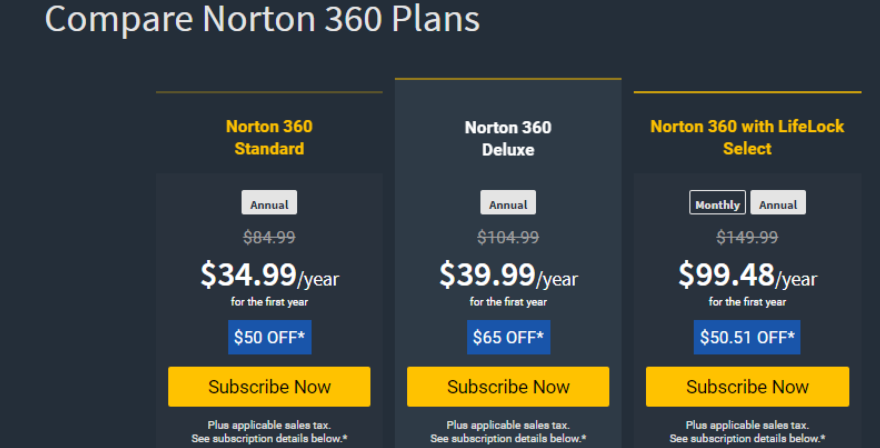
Norton 360 Standard: Multiple layers of protection for a single device and online privacy – all in a single solution. Norton 360 Standard offers protection for 1 PC, Mac, smartphone or tablet.
Norton 360 with LifeLock Select: All-in-one protection for your devices, online privacy, and identity. Norton 360 with LifeLock Select offers protection for up to 5 PCs, Macs, smartphones or tablets. It offers up to 100GB Cloud Backup storage.
Norton 360 for Gamers: A new Norton plan which is designed by gamers to help protect gamers. It is a powerful protection designed for PC gamers. From casual to hard core gamers, Norton 360 for Gamers gives multiple layers of protection for your devices, game accounts and digital assets. The plan includes 24/7 Member Services & Support, offers a 60-day Money Back Guarantee with annual subscription, and is backed by their Virus Protection Promise. Norton 360 for Gamers offers protection for up to 3 PCs, Mac, smartphones or tablets.
Norton will continue to work together so their fellow gamers can have the protection and features they need most. Here are some of the features that Norton 360 for Gamers include:
Simply download the Norton Remove & Reinstall tool to try fixing the issue. Alternatively, contact the Norton support team.
Yes. Your subscription comes with a limited number of licenses to protect your various devices. If you have used up your licenses, you can transfer a license from an unused device to allow installation on another device. To check if you have any licenses left with your subscription, contact support or read the Online support manual.
Sign in to your account to install Norton device security on any supported desktop computer, laptop, mobile phone, or tablet. If you bought Norton device security in a retail store or if you have a product key that is not yet registered to your account, read the Norton online support manual on 'downloading your Norton product purchased from a retail store'. If you have received your Norton product from your service provider, then read the Norton online support manual on 'Installing Norton from your service provider'. In order to successfully install your Norton protection, your device must meet the minimum operating system requirements. Read System requirements to install and set up NortonLifeLock protection for more details about these requirements online.
How do I activate or renew my Norton subscription
A valid Norton subscription ensures that your security is always up to date. You must activate or renew your subscription before the trial or subscription period ends to continue to use all of the Norton features and keep your computer protected. Your computer must be connected to the Internet to complete the activation or renewal process. You can also use Norton Automatic Renewal service for uninterrupted protection.
Your Norton product can display incorrect subscription days for many reasons. Some of the common scenarios are, the purchased product was not installed on your device or it was not activated. If you have not purchased a renewal or an upgrade from the expiration notice, the days from your old subscription will not be added to the new subscription. For example, when your Norton protection is due for renewal and if you purchase a new product from a retail store or online store, the days from your old subscription will not be added to the new subscription. If you see a message asking you to confirm a purchase when you sign in to your account, please contact online support.
This problem can occur if Norton Secure VPN fails to establish a connection to the VPN server. Make sure that your device is connected to the Internet. To fix this problem, uninstall and reinstall the WAN Miniport drivers and reset the network adapter settings. If the problem persists, uninstall and reinstall Norton, or contact Norton support.
To check if the issue you are experiencing is related to a known system problem or outage, visit Norton Services Status page. To access your online vault, you must first sign in to your Norton account, and then log on to your Norton Password Manager vault. The Norton account password is different from the Norton Password Manager vault password. Your Norton account password identifies you and your individual online vault. It also gives you access to other Norton services. Next, your vault password is used to make a key to help secure your vault data. If you get an incorrect password error, you need to know if it is caused by the Norton account password or the Norton Password Manager vault password.
Need more? Visit these stores too:
If you need to get in touch with Norton about an order, an inquiry, or anything else, there are many ways you can do this.
[DM on Messenger You can DM Norton on Facebook: Norton Facebook Messenger page, and you'll be directed to write your inquiry.
Live Chat During normal office hours, Norton operates a Live Chat feature whereby you can talk directly to a representative in real-time. Norton Chat
They are an online store that is available 24/7.
Chat Support is open 24 hours a day, 7 days a week.
Phone Support is open 24 hours a day, 7 days a week.