67% Off AOMEI Backupper Professional
Enter the discount code at checkout and save up to 67% off AOMEI back upper professional at AOMEI.
- 16 Uses
Terms and conditions
Visit AOMEI website for full terms & conditions

Enter the discount code at checkout and save up to 67% off AOMEI back upper professional at AOMEI.
Terms and conditions
Visit AOMEI website for full terms & conditions
Enter the discount code at checkout and save up to 35% off AOMEI back upper server.
Terms and conditions
Visit AOMEI website for full terms & conditions
Shop and get up to 80% off summer sale at AOMEI.
Terms and conditions
Never miss cashback. Our free Chrome extension alerts you automatically at every partner store.
Purchase Professional Edition plus get lifetime upgrades from $49.95 at AOMEI.
Terms and conditions
Purchase Partition Assistant Server + Lifetime Upgrades just for $179 at AOMEI.
Terms and conditions
Save up to $70 off AOMEI back upper server.
Terms and conditions
Visit AOMEI website for full terms & conditions
Get 90 day unconditional money-back guarantee at AOMEI.
Subscribe To The Newsletter To Receive Special Offers And Deals.
AOMEI's headline offer is a 67% discount on Backupper Professional, though the brand's current lineup includes several other strong deals on its backup and partitioning software. Your best choice depends on which product you need and your budget, since only one offer applies at checkout.
For the 67% off Backupper Professional deal: This is AOMEI's primary promotion and delivers genuine savings on one of its flagship products. If you're specifically interested in Backupper Professional, this percentage discount should be your starting point. For comparison, the brand also offers Backupper Professional pricing from $49.95 with lifetime upgrades, which may work out cheaper or more expensive depending on the base price and how deep the 67% discount cuts.
If you need Backupper Server: You have two options to compare. The 35% discount on Backupper Server gives a percentage-based saving, while the $70 off deal provides a fixed amount. Whichever produces the larger discount on your specific purchase is the one to take. Both apply to the same product, so check each in your basket and pick the bigger saving.
For Partition Assistant Server: The brand offers this product with lifetime upgrades for just $179, which may suit your budget if you're looking for a fixed price rather than calculating discounts.
If you're buying a lifetime license: The Summer Sale includes a 25% discount on lifetime licenses, which applies to whichever product offers that option. This beats the 10% discount on yearly licenses, so if you're planning to use the software long term, the lifetime option with 25% off delivers better value.
For first time customers: Subscribe to the newsletter to receive special offers and deals, which can help you find additional savings before you shop.
Since AOMEI runs multiple discounts across different products, you need to identify which software you actually want, then compare the relevant offers in your basket at checkout. The 67% Backupper Professional deal and the Summer Sale discounts (25% on lifetime, 10% on yearly) cannot combine, so whichever single offer produces the highest total saving is the one worth taking.
How Do I Use My AOMEI Coupon Code?
If you’re looking for a discount on your online purchase at AOMEI then you’ve come to the right place. All you have to do is follow the steps below to save money on your next purchase of Windows software backup products. There is always a sale or discount available at AOMEI to be redeemed, and it is our job here at Love Coupons to provide you with these amazing discount codes.
Step 1: Choose a coupon code from the ones listed above
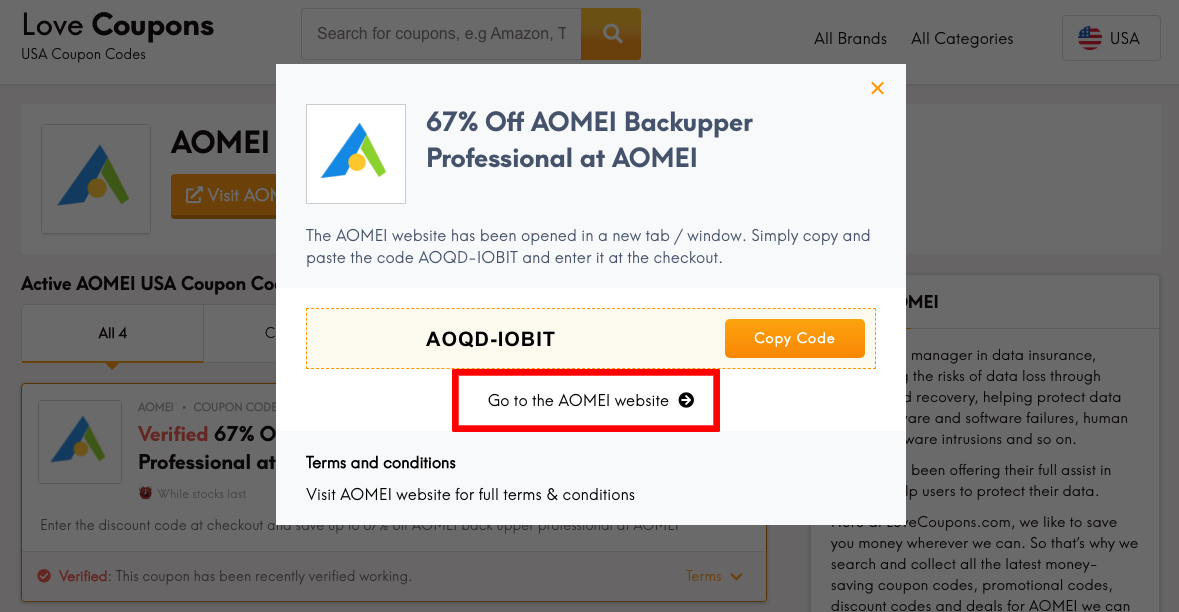
Choose the coupon code from above that you’d like to redeem and it will reveal itself. For example, if you’re looking for 10% off orders at AOMEI then find the coupon above, and click on "Get Coupon" to reveal the code.
Step 2: Copy your coupon code
Simply copy the code that is presented to you. You need this code in order to inform AOMEI to remove part of the cost of your total order.
Step 3: Click on 'Go to the AOMEI site'

After you click, you will be directed to AOMEI.
Step 4: Start Shopping!
Find the best suited product you’d like to purchase at AOMEI and add them to your cart.
Step 5: Make your purchase!
When you are ready to buy your items, go to Cart in the top right-hand corner. You can now start to make your purchase by clicking on 'CHECKOUT'. You will need to either sign in or create an account.
Step 6: Enter the code at the AOMEI checkout
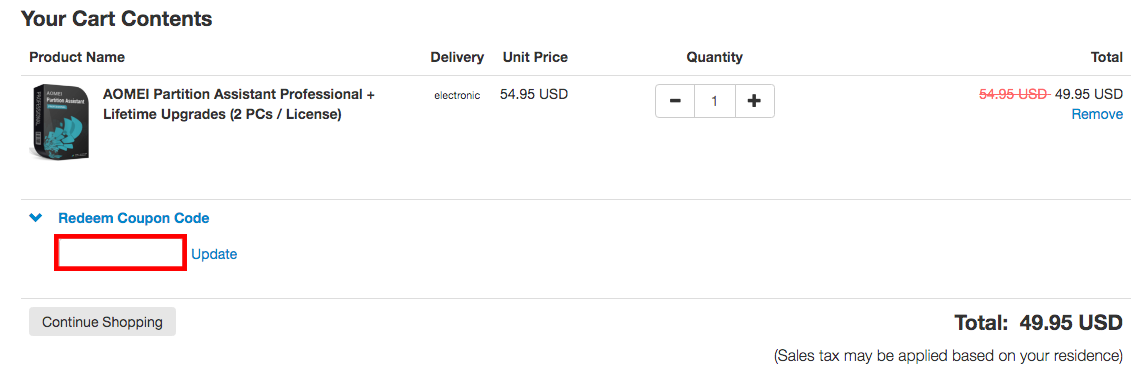
Now that you have the code copied, simply paste it into the “Coupon Code” label at the checkout. Check out the image provided below for an example in case you have any difficulty. If you’re on a computer or laptop, then you will usually find the coupon code box to the left of the checkout page.
However, if you’re on a mobile then it is just as easy to find the coupon code box you need. It is usually present on the checkout form.
Step 7: Enjoy!
Your discount will be applied and items will arrive in the post in just a few days, happy shopping!
Always note: There are terms and conditions associated with certain codes which you must comply with (like applying a code after meeting a maximum amount of money spent) and you cannot apply a code after submitting your order.
Why is my AOMEI discount code not working?
There are several reasons why your AOMEI code might not be working:
Is there a AOMEI code just for students?
Yes! Many retailers offer student discounts as a kind of support throughout their learning journey at college or university. AOMEI offers discounts to students, teachers, schools, colleges, universities, educational institutions, non-commercial users and government agencies.
How do I get my coupon code if I am a student, a teacher, a school, a college, a university, with educational institutions, a non-commercial user or a government agency?
Based on our research, it appears that AOMEI does not offer any buy now, pay later options currently. You can contact AOMEI to see if there have been any updates or changes. You can also visit AOMEI’s homepage to see if they have posted any updated information about buy now, pay later support.
Here are some great tips & tricks for extra savings at AOMEI:
AOMEI Backupper
If you prefer a refund from AOMEI, use the guide below
Once your order is processed successfully, the download link, license code, and an electronic invoice of the software will be immediately sent to your email.
AOMEI adds the VAT (Value Added Tax) at the end on the order page before payment. If you have the privilege of VAT Exemption, please enter the VAT Exemption ID at the checkout.
They provide 24/7 lifetime free technical support via email. Minor updates are free. For the major upgrades, you only need to pay a small amount of upgrade fee to enjoy the full set of advantages of newer versions. If you have already purchased "Lifetime Free Upgrades" before, you can upgrade to the latest version without extra pay in the future.
I cannot download the product using the link given in the email.
If you are having problems downloading AOMEI software, please make sure that you have all download managers and download accelerators turned OFF before downloading. The AOMEI server cannot download software if your system has that type of software active. If you still have problems, please contact AOMEI.
It’s probably because you have visited AOMEI’s website before and this is your second or N time there. What you see now is just the cookies of the former information. What you have to do is clear these cookies by pressing “Ctrl + F5”.
The Love Coupons team spends a lot of time collecting the best and most recent AOMEI coupon codes. The team also tries to list how to use AOMEI coupons codes. Read the content our team writes for more details.
Some brands offer Students discount codes – if AOMEI does offer a Student voucher code then our team here at Love Coupons will try to find them and make them available to everyone.
If you need to get in touch with AOMEI about an order, an inquiry, or anything else, there are a number of ways you can do this.
Send an email
You can send an email at support@aomeitech.com, and they will be happy to help.
Contact Form
Contact AOMEI via their contact form and they will get back to you asap.
DM on Messenger
You can DM AOMEI on Facebook, and you’ll be directed to write your inquiry.
AOMEI is an online retailer that is open 24/7
Customer Support is available 24/7 by email
What makes AOMEI stands above other similar online retailers is their brilliant customer service. They put their customers as a top priority. Their team responds as quickly as possible and through various platforms like Facebook, Twitter and Email. Whatever your inquiry is, AOMEI is always there to help you!