50% Off The Second Room
Book a Kid's Room for 50% of the price of the parents’ room and enjoy a relaxing family stay at Swissotel.
Terms and conditions
- Visit Swissotel website for full T&Cs.

Book a Kid's Room for 50% of the price of the parents’ room and enjoy a relaxing family stay at Swissotel.
Terms and conditions
Save up to 25% on your next stay when you book directly with Swissotel.
Terms and conditions
Get 10% off the best available daily rates at Swissotel hotels and enjoy a comfortable stay for less.
Terms and conditions
Never miss cashback. Our free Chrome extension alerts you automatically at every partner store.
Book today and get the best available rate for luxurious accommodations at Swissotel.
Terms and conditions
Sign up to the newsletter for special offers and promotions at Swissotel.
Swissotel provides luxurious accommodations, and if you're looking to save on your next stay, the "Sign Up To The Newsletter For Special Offers And Promotions" offer is a great starting point. This guide will help you choose the best deal based on how much you plan to spend.
For the best overall value, the "Up to 25% Off Your Booking" deal is generally the most beneficial, especially for larger stays. If you're planning a trip and looking for a great deal on flexible rates, consider the "Best Available Rate to Luxurious Accommodations" offer. Should you need a second room for family or friends, the "50% Off The Second Room" offer is a fantastic way to reduce the cost of bringing more people along. Finally, if you're specifically eyeing hotels that are not part of a special package, the "10% Off The Best Available Daily Rated Hotels" provides a straightforward discount.
Keep in mind that typically only one offer can be applied at checkout. It is best to compare the total savings from each available promotion directly in your basket to ensure you are selecting the one that provides the largest discount for your specific booking.
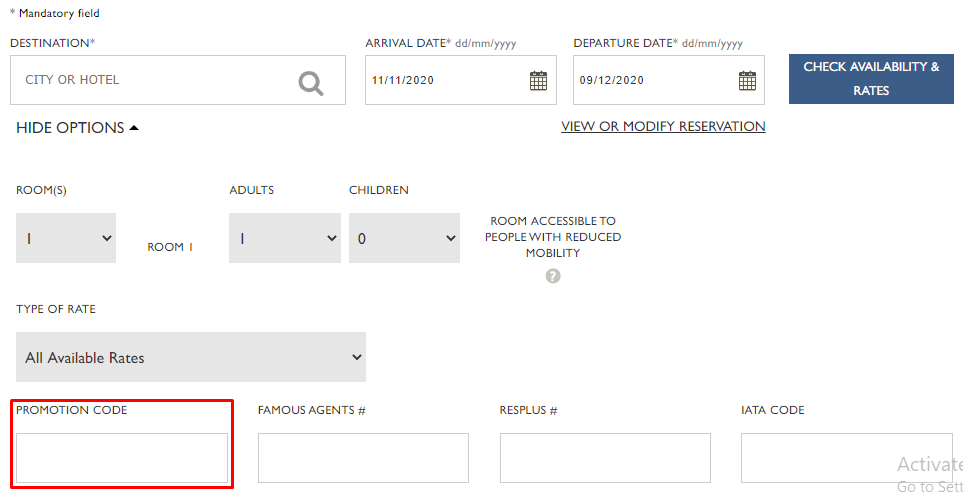
Here are some great tips & tricks for extra savings at Swissotel:
Swissotel accepts VISA, Mastercard, American Express, Union Pay, JCB, and Diners Club.
You can access a reservation on Swissotel.com if it was made online. Look for the "VIEW OR MODIFY RESERVATION" link in the booking widget on the home page. Simply enter your name and confirmation number to retrieve the reservation. To retrieve reservations not made online, you will need to contact Swissotel Global Reservations Centre or the hotel directly.
Yes, you can change your reservation online. First, retrieve your existing reservation through the "VIEW OR MODIFY RESERVATION" link located on the right-hand side of the Home Page in the booking widget. Once you have accessed your reservation, click on Change, that will open your reservation details. Once your changes have been made, you will then click on Submit. You will also be required to accept the changes. An updated version of your confirmation will be emailed to you. Your confirmation number will remain the same.
Please Note: The rate that has been confirmed on an existing reservation might change if you amend your stay dates or room type.
Yes, to cancel the reservation, retrieve your reservation through the "VIEW OR MODIFY RESERVATION" link located on the right-hand side of the Home Page in the booking widget. Once you have accessed your reservation, click on Cancel. You will be required to accept the conditions and then will receive a Cancellation Number. Keep the cancellation number on file.
Yes, you can reserve up to 4 rooms on one reservation. To request connecting rooms, please provide a note in the Special Requests box when you complete the reservation profile.
Phone
+1 800 637 9477