Love Coupons USA
Photobucket discount codes and coupon codes

Photobucket Coupon Codes

4.1 (93 ratings)
9 active offers

Active Photobucket Coupon & Promo Codes

Exclusive This coupon can only be found on our website. Coupon

Use the code and save $16 by purchasing Group Buckets Annual plan at Photobucket.

40
Did this Photobucket coupon code work for you?

Terms and conditions

  • Subject to availability.
  • Use the code to redeem the offer.
  • For full Terms & Conditions please visit Photobucket website.
Exclusive This coupon can only be found on our website. Coupon

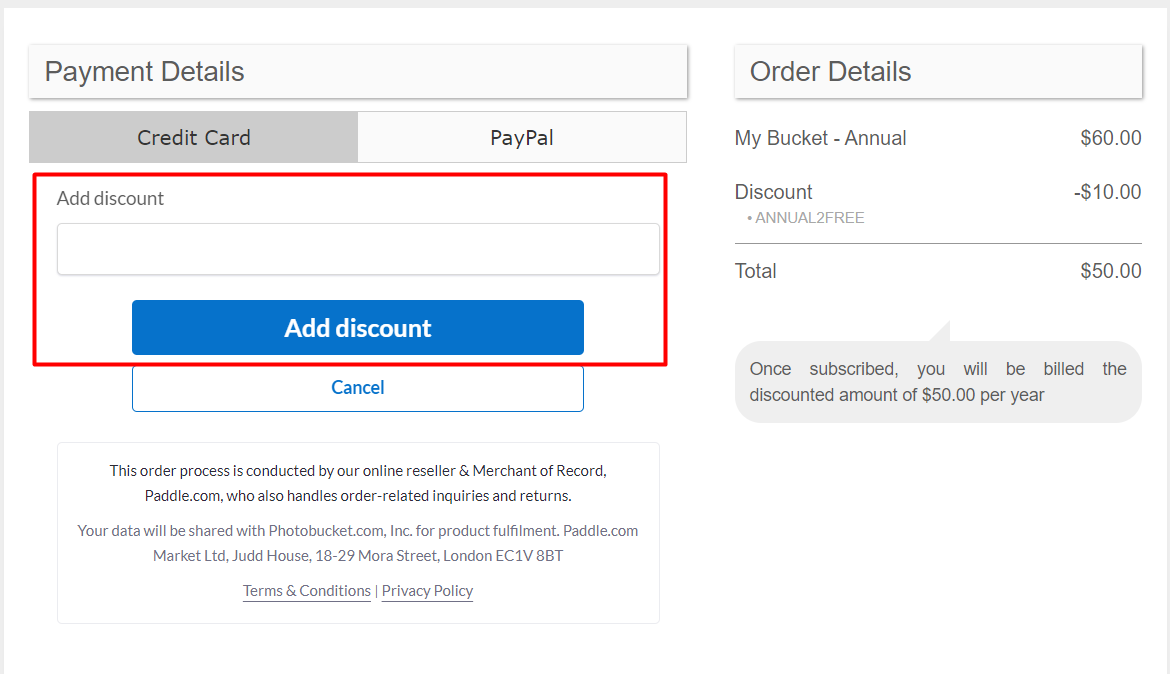
Use the code and save $10 by purchasing My Buckets annually at Photobucket.

33
Did this Photobucket coupon code work for you?

Terms and conditions

  • Subject to availability.
  • Use the code to redeem the offer.
  • For full Terms & Conditions please visit Photobucket website.

Get 1TB of cloud storage from Photobucket for as little as $8 per month to keep your precious memories safe.

Terms and conditions

  • Subject to availability.
  • For full Terms & Conditions kindly visit Photobucket's website.

Never miss cashback. Our free Chrome extension alerts you automatically at every partner store.

Add to Chrome – It's Free

Enjoy 1TB of storage with My Bucket from Photobucket for only $5 each month, ensuring your memories are safe and readily accessible.

Terms and conditions

  • Subject to availability.
  • For full Terms & Conditions kindly visit Photobucket's website.

Share photos easily with friends, family, and clients when you get group buckets for just $8 per month at Photobucket.

Terms and conditions

  • Subject to availability.
  • See the Photobucket website for full terms and conditions.

Share and store your memories with Group Buckets from Photobucket for just $80 a year, making photo organization a breeze!

Terms and conditions

  • Subject to availability.
  • See the Photobucket website for full terms and conditions.

Get reliable hosting from Photobucket for just $13 per month and enjoy secure storage for all your photos and videos.

Terms and conditions

  • Subject to availability.
  • See the Photobucket website for full terms and conditions.

Get free 7-day trial at Photobucket.

Terms and conditions

  • For full Terms & Conditions please see the website.

Sign Up To The Newsletter For Special Offers and Promotions at Photobucket.

Terms and conditions

  • For full Terms & Conditions please visit Photobucket website.

How do I use my Photobucket discount code?

  • Copy a code from Love Coupons and follow the link to the Photobucket website
  • Here you can begin shopping and add any products you want to your bag
  • Once you’re finished you can checkout
  • You’ll then be taken to the shopping bag page where you can paste your code to apply the discount
  • Add your discount Code to the box labelled "discount Code" and click ‘Add Discount’
  • You can then ‘checkout’ and continue with the payment process
How do I use my Photobucket discount code?

Photobucket Money-Saving Hints & Tips

Here are some great tips & tricks for extra savings at Photobucket:

  • Always visit and check Love Coupons for the latest money-saving discount codes and deals at Photobucket before you finish your purchase
  • Join the Photobucket newsletter to get the best offers, money-saving promotions and exclusive deals sent straight to your inbox
  • Be sure to check out the sale offers and discount section on the Photobucket website for the latest promotions and discount offers
  • Follow Photobucket on social media to stay updated with their new arrivals and offers.
  • Download the Photobucket app store for free, activate push notifications and get the latest promotional offers directly to your mobile phone.
  • Sign up to Love Coupons newsletter for our latest weekly offers for brands like Photobucket and many more.

Photobucket FAQs

What payment methods are accepted when purchasing a Photobucket subscription?

They accept VISA, MasterCard, American Express, Discover, JCB cards and PayPal.

As subscriptions are set to automatically renew, prepaid cards and gift cards are not accepted.

How to change subscription plan?

If you've purchased the wrong subscription plan or need to upgrade your current subscription, you can easily do this on the website by following the steps below.

Important: Do not cancel your subscription as this will also cancel your automatic billing. Once your automatic billing is cancelled, you won't be able to upgrade or switch to a different plan anymore.

  • Click on your Profile Icon at the top right corner

  • Click Settings

  • Click the Membership tab

  • Click Upgrade or Change Plan

  • Select the plan that fits your needs

  • You'll be redirected to the billing page to confirm your payment information.

How to cancel Photobucket subscription?

To cancel your subscription, simply login to your account and head to your account settings page. Keep in mind that by cancelling, your recurring payments will be turned off, and your subscription will remain active until the end of the current subscription period.

Note: Photobucket no longer offers a free account option. Once your subscription expires, your account may be deactivated. This means you won't have access to your account or any of your images until you purchase a subscription plan again.

How to purchase a subscription plan?

Photobucket offers subscription plan options to best fit your needs. You can find out which plan works for you by clicking here. To purchase a subscription plan:

  • Login to your account.

  • Click on your profile icon in the top-right corner of the page, then choose Settings. This will take you to your Account Settings page.

  • On your Account Settings page, click the Manage Membership tab to see your current plan, then click Change Plan.

  • Select your billing cycle. You can choose between a Monthly plan or a Yearly plan.

  • Once you've selected your billing cycle, choose your storage plan by clicking the Purchase button.

  • On the billing page, select your payment method. You can pay with a Credit/Debit Card or with a PayPal Account. We accept Visa, MasterCard, American Express, Discover, and JCB cards.

  • Enter your country and zip code if paying with a card, then enter your payment information. If paying with PayPal, you will be asked to log in to your PayPal account

  • Once you've entered your payment information, simply click the Subscribe Now button.

Photobucket Contact Details

Email support@photobucket.com